EXPLORED
Team Page
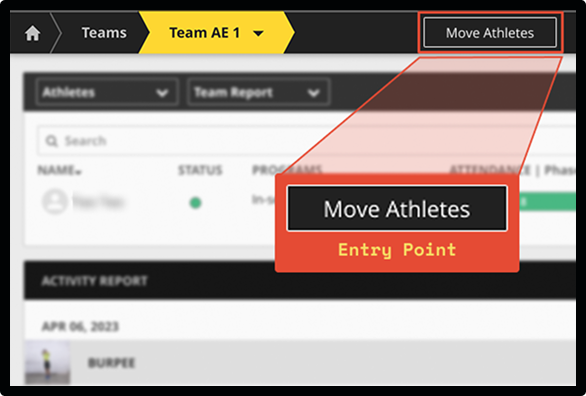
Logical organizational context, but restricted access.
I connected customer feedback, usage friction, and business urgency to identify the right problem to solve, then redesigned the workflow around how large teams actually operated.
UX/UI Designer
PrioritizationWorkflow designValidation + delivery
ProductEngineeringCustomer Success
~80%
estimated reduction in task time for large transfers

BridgeAthletic is a strength and conditioning platform used by coaches and performance teams to manage athletes, training programs, and day-to-day performance workflows.

Improving the efficiency of the web platform was already part of the product roadmap.
Product had collected a backlog of Pivotal stories, and there were multiple areas where coaches were experiencing friction. Bulk athlete movement between teams was one of them.
The question was not yet
How should we redesign athlete movement?
It was
Which problem should we solve first?
I proposed evaluating the issues across three dimensions.
I used the Customer Success conversations to add context behind the individual Pivotal stories and prepared the issues for comparison.
Customer signals
Pivotal stories
Feature requests and pain points from customers
Customer Success context
Real-world examples and operational details
Observed workarounds
What customers were doing outside the product
Evaluation framework
Criticality
How important is the task to the customer's work?
Impact
How severely does the problem interfere with completing it?
Frequency
How often does the user encounter the problem?
Outcome
Priority 1
Athlete movement
Advocated for athlete movement, final priority aligned with PM+CTO.
Several factors converged around athlete movement. It affected significant customers, became increasingly costly at roster scale, was beginning to leak outside the product, and arrived at a particularly relevant moment in the customer cycle.
Customer significance
Several larger accounts were raising the issue, and it was impacting their day-to-day operations.
Criticality
High-value customer, day-to-day operations.
Operational cost
The task multiplied quickly across large rosters, with some coaches needing to move athletes several times a day.
Frequency
Happening constantly at scale.
Workflow leakage
Some customers had started completing parts of the workflow outside Bridge, which reduced product usage and value.
Impact
Work happening outside the product.
Timing
The upcoming off-season and renewal discussions made this a time-sensitive opportunity.
Urgency
Relevant to the customer cycle.
Impact to effort
Engineering estimated a relatively contained implementation effort compared to the potential value.
Leverage
High impact, manageable effort.
THE BOTTOM LINE
Athlete movement combined customer significance, repeated operational cost, workflow leakage, timely relevance, and favorable implementation leverage.
How might we let coaches move many athletes efficiently without removing the context they need to make those changes safely?
ENTRY POINT
CONTEXT AT THE DECISION POINT
Initially, we explored placing athlete movement on the Team page since it was the logical organizational context.
However, it was not accessible to coaches who need to actually perform the task.
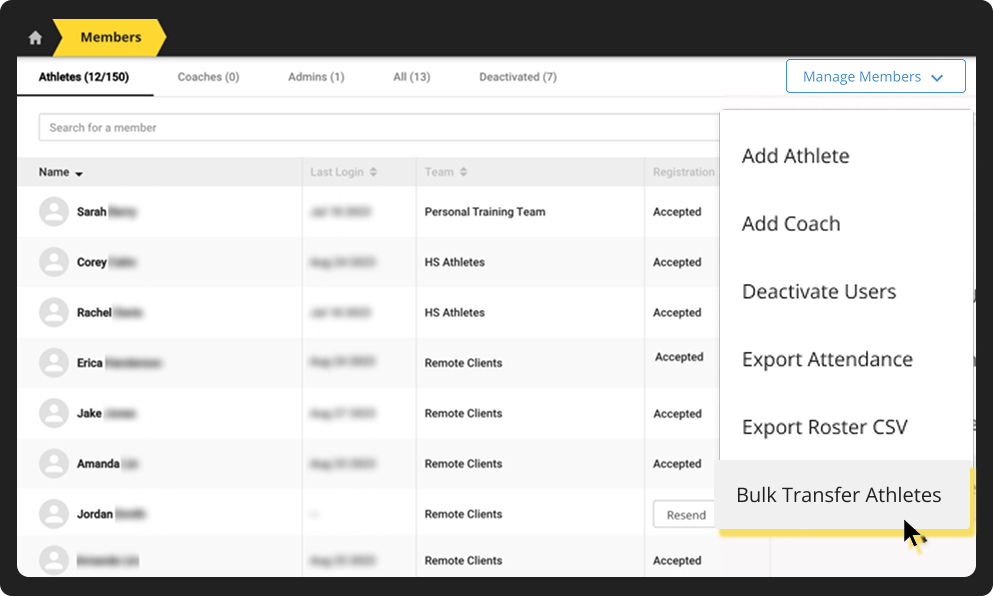
We decided to move the workflow to the Members page, where coaches could access it directly.
EXPLORED
Logical organizational context, but restricted access.
SELECTED
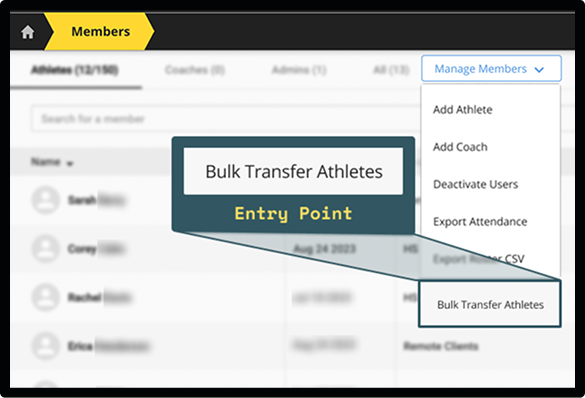
Accessible to the coaches responsible for the task.
THE DECISION
Move the workflow to Members rather than expand permissions around Team access.
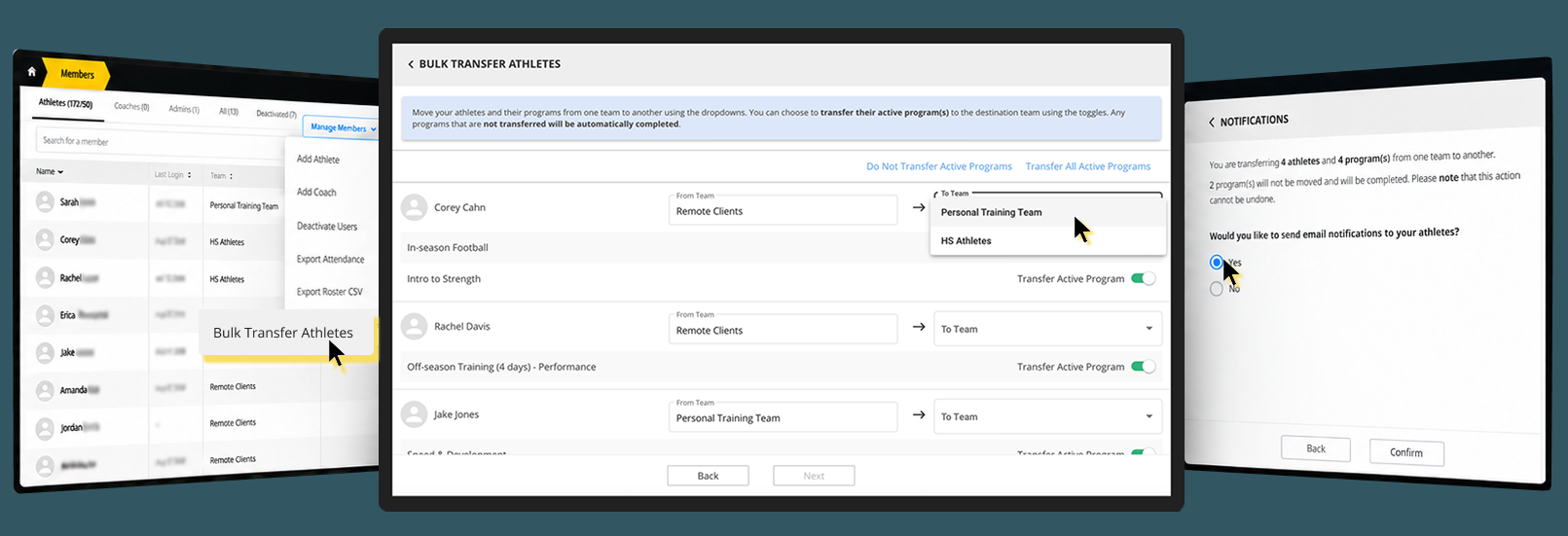
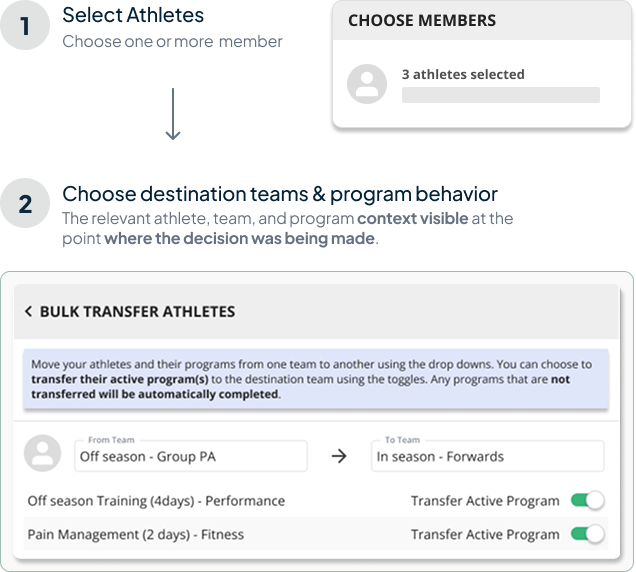
We explored step-by-step flow to simplify the task, breaking it into separate screens.
In practice, users still had to carry the context in memory, which in the end did not reduce mental effort
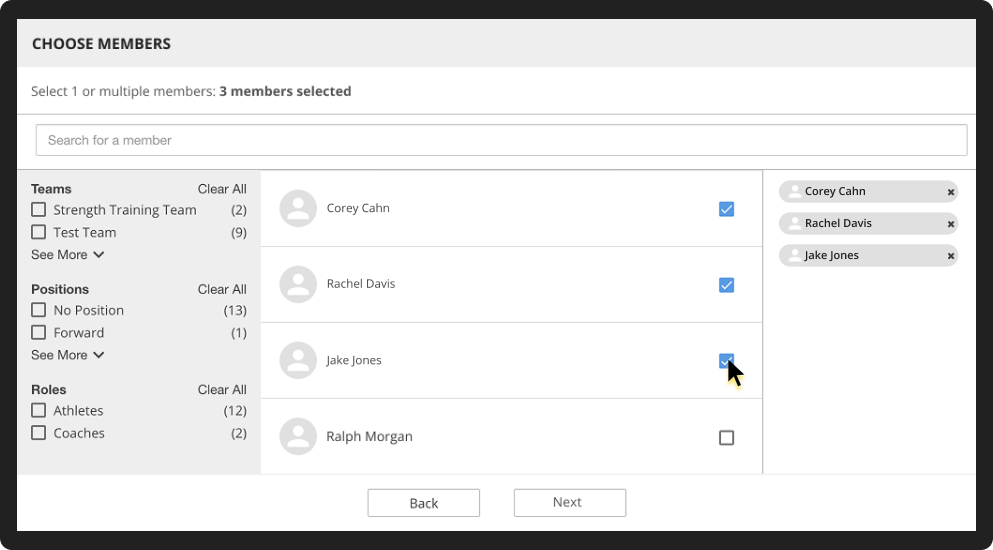
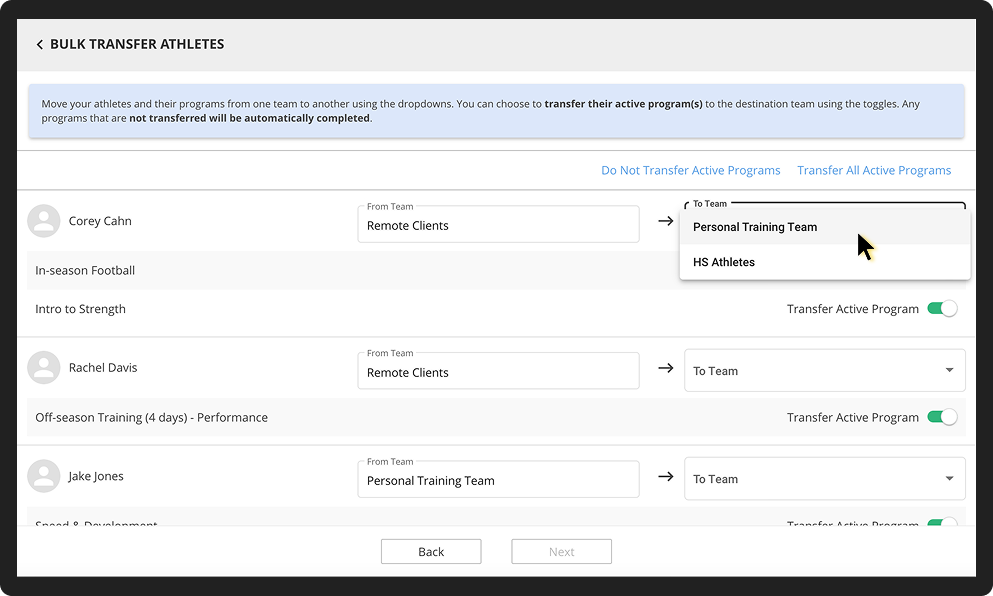
A more integrated experience kept the key context visible and made the task easier to complete.
EXPLORED
Split into multiple steps
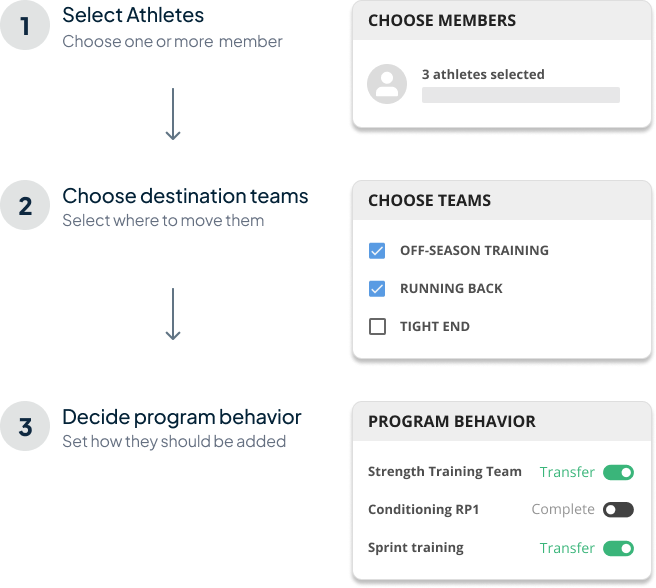
Less visible complexity
More information to remember
SELECTED
All key information in one place
Less working memory burden
Full context visible
THE TAKEAWAY
Reducing what was visible on each screen does not always reduce the cognitive load.
Further into the design process, a product demo and discussion with Engineering surfaced an important system level constraint.
What looked from the interface like a straightforward reassignment could unintentionally affect existing training information.
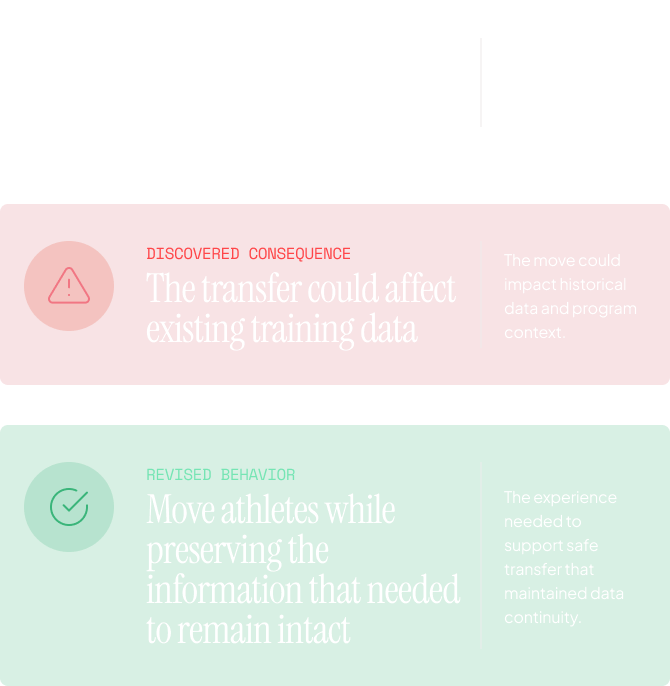
“Where should those athletes move?”
AND
“What needs to remain intact after the move?”
We validated the bulk movement workflow within a limited timeframe, aligned with the upcoming off-season and release plans. This allowed us to test the core logic and experience internally.
Withing the release window, we were able to confirm:
Workflow logic
The end-to-end flow worked as intended.
Terminology
Labels and messaging were clear.
Edge cases
We tested key scenarios and error states.
These areas required real world usage, which was not feasible during this release:
Direct coach usability
We did not test with coaches in live environments.
Real world adoption
We could not measure actual uptake or frequency of use.
METHOD
Scenario-based internal validation
with Product, Engineering and Customer Success.
WHY
Direct coach recruitment was not practical
coaches were busy preparing for the off-season.
THE BOTTOM LINE
We made the best possible validation calls given the constraints, while being clear about what remained to be tested in the real world.
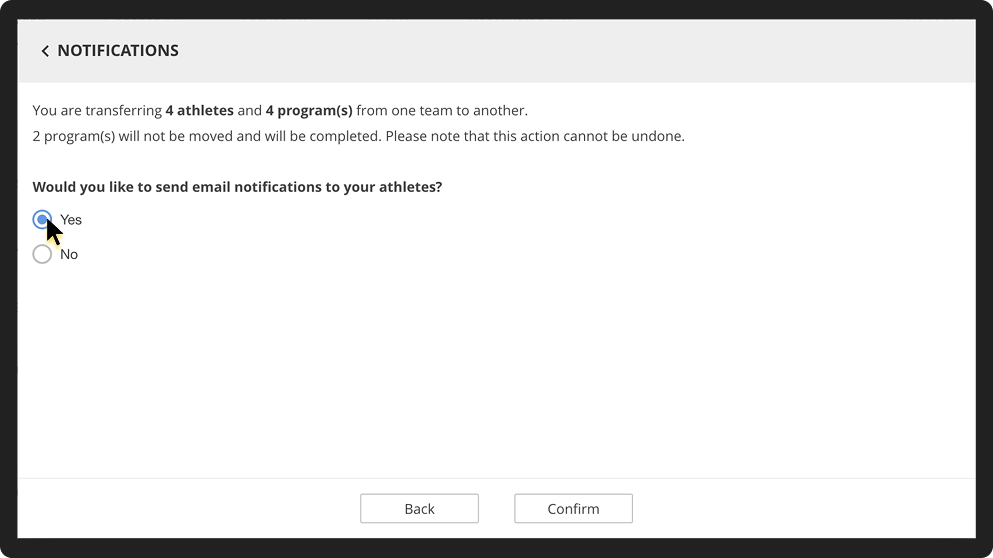
the goal was not simply to minimize clicks. It was to remove repetitive work without making a high-impact bulk action feel opaque or risky.
less task time
This was an interaction level estimate, not measured post-launch performance metric.

From wireframes, high-fidelity flows to testing and iteration.

Clarified states and behavior with Engineering.

Reviewed the experience against the design.

Prepared material for Customer Success demos.
THE PROCESS
Design doesn't end at handoff for me. Staying involved through implementation helped ensure the final experience matched the intended design and was ready for a successful rollout.
The feature addressed a real need and received positive initial feedback, but adoption required support, education, and time.
Positive early response from Customer Success
The product limitation had been addressed.
Bulk athlete movement was now support inside Bridge.
Some customers had already built alternative workflows outside the app.
Moving that behavior back to Bridge required adjustment.
Customer Success planned additional sessions with coaches to help teams adopt new workflow.
THE BOTTOM LINE
Fixing the product experience and changing established behavior were not the same thing.
The project reinforced a few important lessons that continue to influence how i approach product design.
The most frequent issue is not automatically the most important.
Athlete movement became Priority 1 because several factors converged: customer significance, operational cost, workflow leakage, timing, and implementation leverage.
Breaking the workflow into more steps initially appeared cleaner.
For large transfers, it increased the amount of information coaches had to remember.
Reducing visible complexity and reducing cognitive effort are not always the same thing.
Once customers have built a workaround outside the product, removing the original friction is only part of the job.
Adoption may still require support, communication, and time.